
Sabrina Carpenter - Emails I Can’t Send Ukulele Chords
Before you play, tune your ukulele and use the tools below to set up your view and flow.
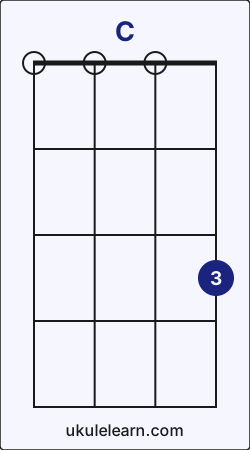 Ukulele C chord diagram
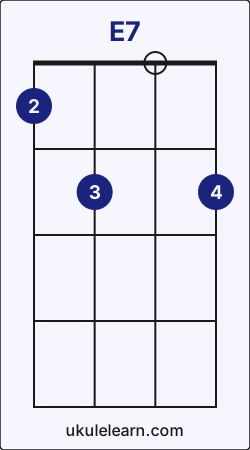 Ukulele E7 chord diagram
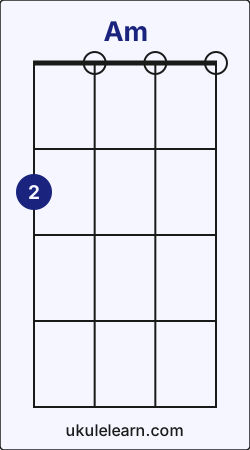 Ukulele Am chord diagram
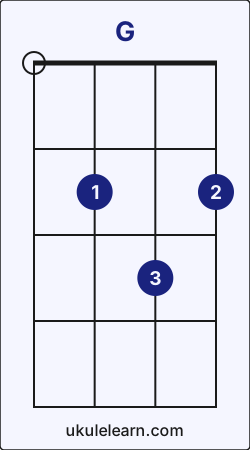 Ukulele G chord diagram
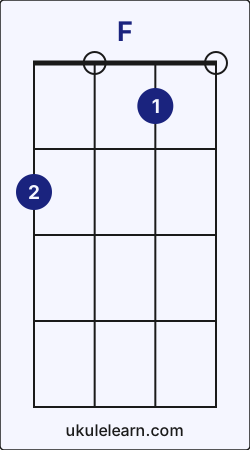 Ukulele F chord diagram
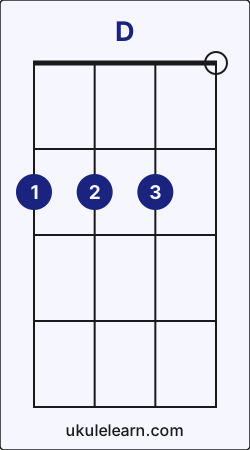 Ukulele D chord diagram
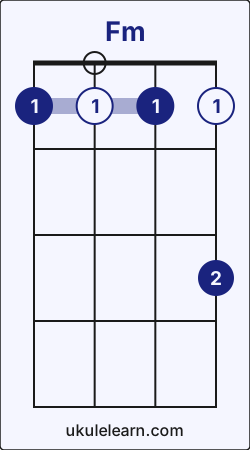 Ukulele Fm chord diagram
[Opening]
It’s [C]times like these wish I had a [E7]time machine, so
[Am]I could see what you did [G]October 13th
At [F]10:15, were you [C]really asleep?
Were you [D]lying to me and the [G]family?
[section 2]
There’s no [C]”us” in us when I’m [E7]lacking trust
You [Am]wanna discuss, ugh [G]You disgust me
Don’t [F]make me cuss you out [C]Why’d you let me down?
[D]Don’t say sorry [G]now
[section 3]
And [C]thanks to you I, [E7]I can’t love right
[Am]I get nice guys and [G]villainize them
[F]Read their texts like they’re [C]having *** right now
[D]Scared I’ll find out [G]that it’s true
[section 4]
And [C]if I do, then [E7]I blame you for
[Am]Every worst that [G]I assume
When I’m [C]forty-five, someone [E7]calls me their wife
And he [Am]fucks our lives in one [G]selfish night
Don’t think I’ll [C]find forgiveness as [C]fast as mom did
And, [D]God, I love you, but you’re [G]such a dipshit
[Fm]Please *** fix this
[Closing]
‘Cause you [C]were all I [G]looked up [Am]to
Now I [Fm]can’t even look at [C]you [Am] [G] [C]
How to play Emails I Can’t Send on Ukulele (Step-by-step)
Sabrina Carpenter - Emails I Can’t Send on ukulele requires 7 chords and 12 core chord transitions. You can find the full step-by-step guide below. Before you start, tune your instrument. The song uses the ↓↑-↓↑-↓↑-↓↑ pattern; practice it muted first, or simplify to downstrokes while you learn the changes.
Emails I Can’t Send uses these transitions most often: Am → G (6), G → C (6), and C → E7 (5). These transitions may feel a little challenging at first, but with steady practice you can play this song quickly.When you are ready, begin with C - E7 chord transition.
1. C → E7 chord transition
To move from C to E7;
- Slide your ring finger on A string from fret 3 to fret 2.
- Place index finger on G string fret 1.
- Place middle finger on C string fret 2.
2. E7 → Am chord transition
To move from E7 to Am;
- While playing E7, first lift your index finger and ring finger.
- Lift your middle finger from C string fret 2 and place it on G string fret 2.
3. Am → G chord transition
To move from Am to G;
- Lift your middle finger from G string fret 2 and place it on A string fret 2.
- Place index finger on C string fret 2.
- Place ring finger on E string fret 3.
4. G → F chord transition
To move from G to F;
- While playing G, lift your ring finger from E string fret 3.
- Lift your index finger from C string fret 2 and place it on E string fret 1.
- Slide your middle finger from A string fret 2 to G string fret 2.
5. F → C chord transition
To move from F to C;
- While playing F, first lift your index finger and middle finger.
- Place ring finger on A string fret 3.
6. C → D chord transition
To move from C to D;
- Lift your ring finger from A string fret 3 and place it on E string fret 2.
- Place index finger on G string fret 2.
- Place middle finger on C string fret 2.
7. D → G chord transition
To move from D to G;
- Lift your index finger from G string fret 2 and place it on C string fret 2.
- Slide your middle finger from C string fret 2 to A string fret 2.
- Slide your ring finger on E string from fret 2 to fret 3.
8. G → C chord transition
To move from G to C;
- While playing G, first lift your index finger and middle finger.
- Lift your ring finger from E string fret 3 and place it on A string fret 3.
9. G → Fm chord transition
To move from G to Fm;
- While playing G, lift your ring finger from E string fret 3.
- Lift your index finger from C string fret 2 and place it on G string fret 1.
- Slide your middle finger from A string fret 2 to E string fret 1.
- Place pinky on A string fret 3.
10. Fm → C chord transition
To move from Fm to C;
- While playing Fm, first lift your index finger, middle finger, and pinky.
- Place ring finger on A string fret 3.
11. Am → Fm chord transition
To move from Am to Fm;
- Lift your middle finger from G string fret 2 and place it on E string fret 1.
- Place index finger on G string fret 1.
- Place pinky on A string fret 3.
12. C → Am chord transition
To move from C to Am;
- While playing C, lift your ring finger from A string fret 3.
- Place middle finger on G string fret 2.
Emails I Can’t Send chord transition analysis
A short, data-driven summary of the chord flow in Emails I Can’t Send.
- Emails I Can’t Send includes 43 chord transitions, 12 of them unique.
- These transitions represent 0.01% of all chord transitions in Ukulelearn.
- Emails I Can’t Send contains 6 of the top 10 transitions across Ukulelearn.
- These transition patterns show how Emails I Can’t Send connects to the rest of Ukulelearn. Mastering them helps you move to similar songs faster.After C, the most likely next chords across Ukulelearn are G (35%), F (16%), and D (11%).
- C → G: 35%
- C → D: 11%
After G, the most likely next chords across Ukulelearn are C (25%), D (24%), and Am (13%).- G → C: 25%
- G → Am: 13%